If you're considering Google Ads for your insurance agency, start with one question: can you follow a paid inquiry from the search to the person in your office who handles it? Until that path works, a larger keyword list or budget only adds more uncertainty.
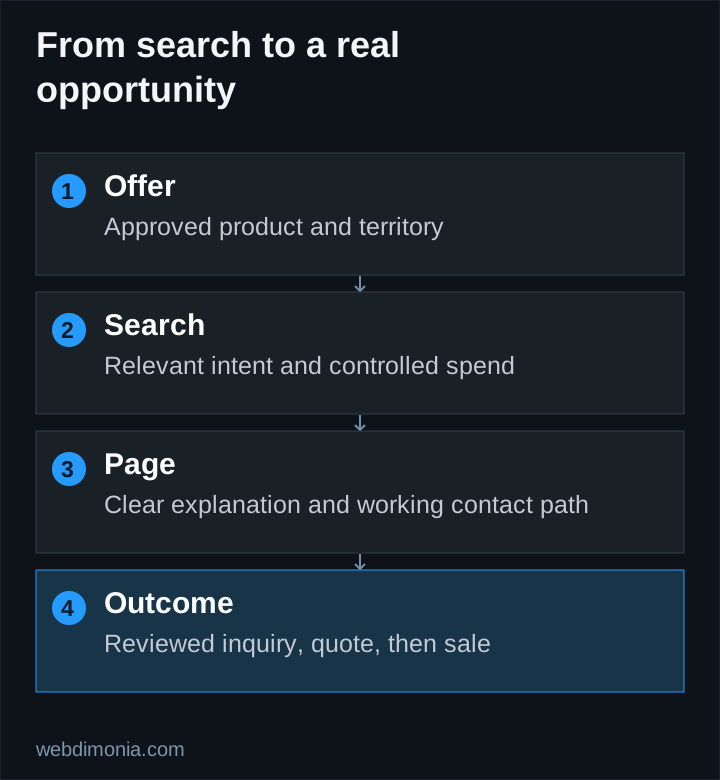
A first campaign needs an approved service and territory, a relevant page, reliable tracking and someone who reviews the inquiries. This guide walks through those decisions before you spend.
Check whether the agency is ready
Confirm the products and territories the agency can advertise, carrier review requirements, office capacity and the correct destination for inquiries. Google's financial-services advertising policy requires compliance with applicable requirements; the precise obligations depend on the advertiser and location. A platform approval is not a substitute for agency or carrier review.
Have someone test the landing page and form on a phone. Confirm that the receiving team can distinguish a quote request from an existing-customer service inquiry. If responses are inconsistent, fix the intake process before paying to send more people into it.
A launch brief should name the owner of the account, the budget, the selected products, the geographic settings, the approved copy, the conversion definitions and the review schedule.
Start with a manageable search campaign
For a first test, our recommendation is to keep the structure small enough to inspect. Group searches by a meaningful service or customer intent, then connect each group to a relevant page. Do not split a modest budget across every possible product and town before learning which inquiries the office can serve.
Separate agency-name searches from searches by people who have not chosen an agency. Someone looking for your phone number is different from someone comparing coverage providers. Report those groups separately so existing demand does not hide the cost of finding new prospects.
A carrier-name query needs additional judgment. It can signal shopping, a login request, a claims question or a search for a corporate contact number. Review the intended audience and permitted wording rather than assuming all carrier searches are valuable acquisition traffic.
Choose intent before chasing volume
Build a seed list around the service, location and action a prospective customer might search for. Exclude unsupported products and clearly irrelevant purposes. Use Keyword Planner for directional research and live search-term review after launch; a keyword list alone does not establish demand or likely profitability.
Google's match-type guidance explains that exact match can include searches with the same meaning or intent. It is not a literal-text lock. Review what actually triggers the ads even when the starting list looks narrow.
Our keyword guide covers intent groups, and the negative-keyword guide explains exclusions that need agency-specific judgment.
Connect the ad to a useful destination
A landing page should confirm the service, identify the agency, explain the next step and offer a working way to contact the office. It should not imply that completing a general inquiry instantly binds coverage or produces a guaranteed price.
Keep the page's visual quality consistent with the rest of the site. Relevant imagery, legible text and a clear mobile action matter more than adding every possible badge. Use the landing-page outline to plan the content before building extra pages.
For geographic settings, inspect the actual options. Google's location-targeting documentation distinguishes presence from interest and notes that targeting is not perfectly accurate. For a local test, consider presence-based settings and review location reports and inquiry eligibility. Do not treat the setting as a licensing safeguard.
Set a total budget and meaningful measurement
Separate money paid to Google from management, landing-page work and other operating costs. Webdimonia's Google Ads management starts at $1,499 per month, with ad spend separate and additional pricing described on our pricing page. Use the budget worksheet to judge the complete cost.
Before launch, define an inquiry, a qualified inquiry and a sale. A button click is an interaction; a received form is an inquiry; a staff-reviewed opportunity is a different stage. Avoid counting all three as interchangeable successes.
Keep contact details and freeform answers out of general analytics events. Choose an appropriate, permitted process for connecting campaign information to later business outcomes. The conversion-tracking guide lays out that distinction.
Review the first test as a business owner
Inspect spend, search intent, routing failures and reviewed inquiry quality. Record changes with dates. If the campaign sends the wrong audience, fix targeting and messaging. If relevant inquiries arrive but go unanswered, repair response handling. If qualified opportunities do not make economic sense, reconsider the offer, budget or channel.
There is no universal number of days or clicks that proves every insurance campaign works. Decide the spend limit and evidence requirements in advance, allow for the actual sales lag, and avoid scaling from a dashboard total that the office has never reconciled with real customers.