A search for an insurance job, a claims phone number and a new policy can all contain the same carrier name. Negative keywords help you separate those intents, but a careless exclusion can also block someone you wanted to reach.
Build the list from the campaign's purpose and actual search terms. Start with obvious mismatches, then review the ambiguous ones with someone who knows the office's services.
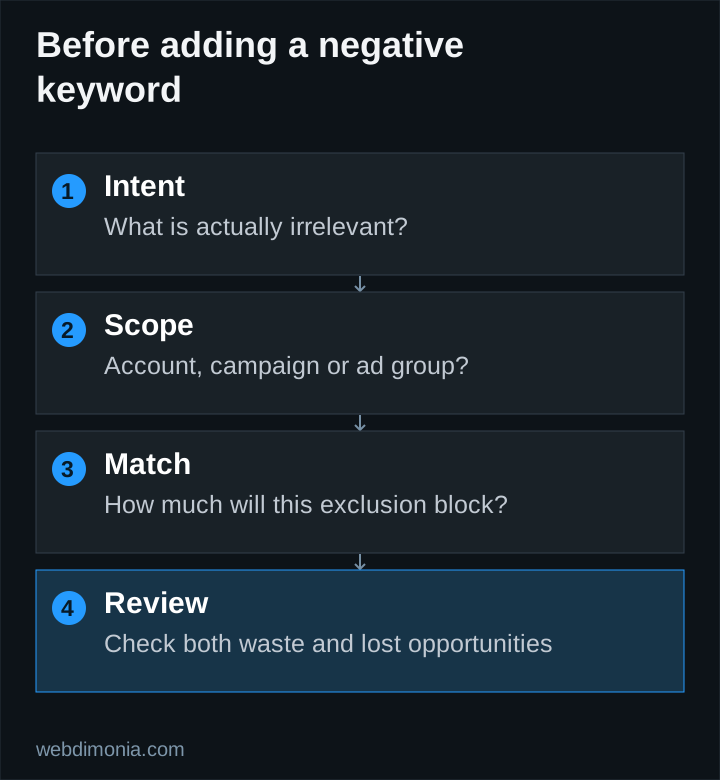
Start with three levels of exclusion
Account-wide exclusions should be irrelevant across the account's applicable campaigns. Employment searches may qualify when the account is solely acquiring insurance customers and has no recruiting activity.
Campaign exclusions reflect that campaign's product and purpose. An unsupported coverage type might belong here rather than at the account level, especially if another campaign does offer it.
Ad-group exclusions can help route intent between groups, but use them sparingly. A complex web of exclusions can accidentally stop useful searches from reaching any ad.
Use an annotated starter worksheet
These are categories to investigate, not an upload-ready list.
| Pattern | Example to inspect | Condition before excluding |
|---|---|---|
| Jobs | insurance agent jobs | The campaign is not recruiting |
| Training | insurance licensing course | The agency is not promoting training |
| Unsupported products | a coverage type the office does not offer | Confirm it is irrelevant at the chosen scope |
| Account access | policy login | The campaign is for acquisition, not customer support |
| Corporate contact | corporate claims phone number | Confirm the agency cannot usefully serve that intent |
| Research-only materials | insurance exam practice questions | The purpose is unrelated to becoming a customer |
Review singulars, plurals and synonyms where needed. Google explains that negative keywords do not expand like positive keywords. Do not assume that excluding one form removes every related concept.
Understand the negative match type
For Search, negative broad match blocks a query containing all the negative terms in any order. Negative phrase match requires those terms in that order. Negative exact match blocks the specified query without extra words. These rules differ from positive keyword matching; use Google's current examples when checking an uncertain case.
Consider the negative phrase "insurance jobs". It is designed to block searches containing that phrase, including “local insurance jobs.” It is not the same as excluding every search about employment in insurance.
Now consider negative exact [insurance jobs]. That is narrower: the additional word in “local insurance jobs” changes the outcome. Selecting the wrong negative match type can leave irrelevant traffic running or remove more traffic than intended.
Be careful with attractive-looking shortcuts
Do not automatically exclude “free.” A person asking for a free quote may still be a legitimate prospect. Do not automatically exclude “cheap” or “affordable” because you prefer a different brand tone. The right decision depends on the offer and the actual inquiry quality.
Carrier names need particular care. A query might be a policyholder trying to log in, but it might also be a prospective customer looking for a nearby agent. Use the complete intent, not the presence of a brand alone, to make the decision.
Geographic exclusions also require context. A visitor can mention a place for reasons other than residence, and keyword exclusions are not a reliable substitute for geographic settings or eligibility checks. Review the campaign setup guide for the wider targeting decisions.
Keep a change log
For every meaningful addition, record the date, the observed query or pattern, the negative text, match type, scope and reason. Include who approved it when the decision depends on product availability or carrier requirements.
Before applying a shared list, inspect every campaign that will receive it. Google's negative-keyword list guidance explains how lists can be assigned across campaigns. Reuse is convenient only when the exclusion is actually appropriate in each destination.
After the change, review both unwanted traffic and the relevant traffic you hoped to retain. If impressions or inquiries fall sharply, inspect conflicts before assuming that demand disappeared.
Make review part of the operating routine
Check search terms frequently enough during a new campaign to catch obvious waste before it consumes the agreed test budget. Once the account is stable, set a review cadence that reflects spending, volume and the pace of change. There is no useful universal rule that every account needs the same daily list of edits.
Combine query review with staff feedback. “Wrong product” and “existing customer” are more useful labels than “bad lead,” because they suggest different actions. See the diagnostic guide when poor performance may come from routing, tracking or response handling rather than the search itself.
The best negative list is explainable and maintained. Its value comes from the irrelevant searches it removes without cutting worthwhile opportunities, not from the number of rows it contains.