“Auto insurance quote” and “auto insurance customer service” share two words but describe different jobs. Paying for both without a plan can fill a new-business campaign with people who need help from an existing insurer.
Build your keyword research around the requests your office can serve. The examples below are starting points for research, not a ready-to-upload list or a claim about search volume and click prices.
Separate the jobs a searcher is trying to do
Someone searching for an auto insurance quote, a claims phone number and an insurance job may all use the word “insurance.” Their intentions are very different.
| Intent group | Illustrative searches | Planning decision |
|---|---|---|
| New quote | auto insurance quote in [city] | Consider only for an approved, supported offering |
| Agency selection | insurance agent near me | Match to the real office and relevant service |
| Existing customer | [carrier] policy login | Usually separate from new-customer acquisition |
| Agency name | [your agency] phone number | Report separately from new-audience searches |
| Education | what information is needed for a quote | Often better served by useful organic content |
| Employment | insurance agent jobs | Exclude from an acquisition campaign where irrelevant |
A search can be ambiguous. Do not assume that “customer service” always has no value or that “cheap” always means an unsuitable customer. Review the actual query, the agency's offer and the outcome before choosing a rule.
Build a small keyword map
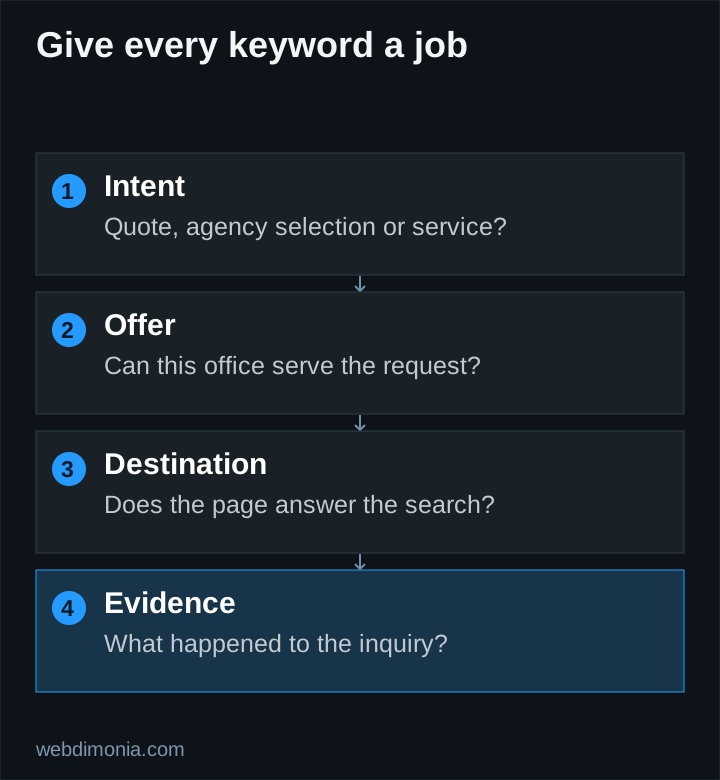
Choose one approved product or a tightly related group for the initial test. List a few ways a prospect describes it, then the relevant quote or agent-seeking modifiers. Map the group to the page that genuinely answers that need.
For each seed, record the reason it belongs, the intended location, its landing page and the outcome you want to measure. If the agency does not offer a product, adding its keyword because it appears inexpensive will not solve the business mismatch.
Use Google Keyword Planner to research terms in the intended geography and inspect available estimates. Treat forecasts as planning inputs. A national estimate is not proof of demand in your service area, and a competitor's visible keyword does not reveal whether it produces profitable business.
Understand what match types actually control
Google's keyword matching documentation describes exact match in terms of meaning or intent, phrase match as broader and broad match as broader still. None should be treated as a substitute for reviewing actual search terms.
For a first, tightly scoped Search test, exact and phrase keywords can make the starting plan easier to inspect. That is a practical recommendation, not a rule that broad match never works. Broader coverage needs an appropriate budget, useful conversion signals and ongoing quality review.
Do not add many near-identical variants just to make the account look comprehensive. Organize around decisions you need to make: product, audience intent, destination and economics. Excessive fragmentation can leave you with many groups and little useful information in each.
Treat carrier-brand searches carefully
A search containing GEICO, Allstate or Farmers may be about buying coverage, managing a policy, locating an office or contacting corporate support. Read the intent before paying for it.
Google's trademark policy distinguishes keyword use from restrictions on trademark use in ads. That platform policy does not grant permission under a carrier agreement. Confirm the agency's advertising requirements and avoid wording that misrepresents affiliation or implies a corporate site.
Keep your own agency-brand activity distinguishable in reporting. A low cost per inquiry from people already searching for you should not be used to imply that all non-brand acquisition is equally efficient.
Review search terms after launch
A keyword is what you target; a search term is what a person actually searched. Google's search-terms report helps you inspect the relationship, although reporting is not a complete log of every query.
For each meaningful pattern, choose an action: keep it, add a more relevant page, refine the message, narrow the campaign or exclude the irrelevant intent. Check the consequence of an exclusion before applying it across the whole account.
Use the negative-keyword worksheet to distinguish universal exclusions from product-specific ones. An exclusion appropriate for auto coverage may block valuable demand in another campaign.
Judge a keyword by the business it brings
Clicks and click-through rate can help diagnose relevance, but the office ultimately needs useful opportunities at an acceptable cost. Record whether inquiries are in territory, relate to supported products and reach a real conversation.
A term with fewer clicks can be more valuable than a broad term with many inexpensive interactions. Conversely, do not cut a relevant term after one poor inquiry. Consider the spend, sales lag and the amount of evidence available.
Start with a map you can explain to the agency owner in a few minutes. Expand when actual search terms and reviewed outcomes reveal a worthwhile opportunity, not simply because a tool can generate another thousand keywords.