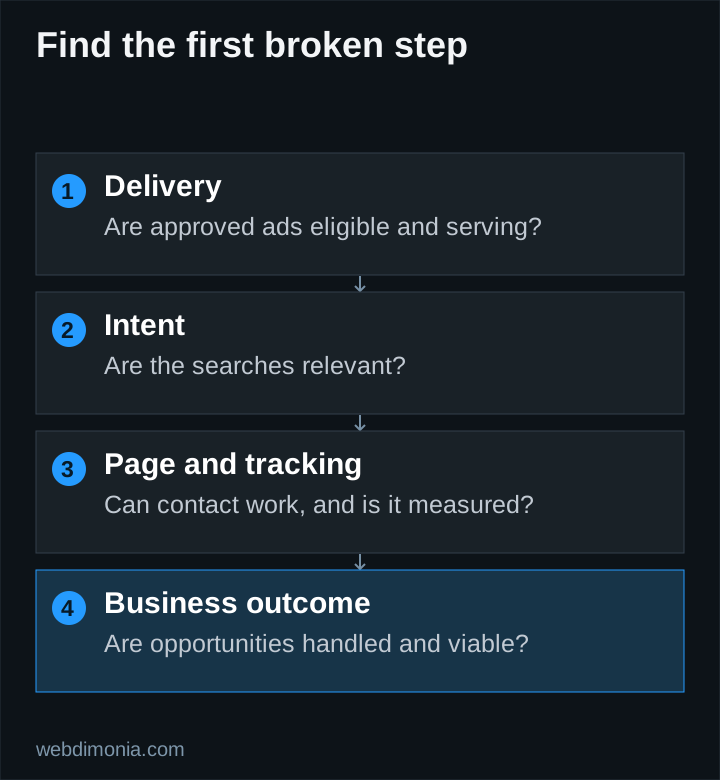
Before raising an underperforming campaign's budget, locate the break. Are the ads failing to show? Are the searches wrong? Are people reaching the page but not contacting you? Or are inquiries arriving that the office can't use?
Each problem needs a different response. Work through the checks below in order, and keep a record of what you change so the next review can tell you something.
1. If ads are not showing, inspect delivery first
Check campaign and ad status, billing, dates, schedule, geographic settings, keyword eligibility and policy notices. Read the specific account message before assuming the market has no demand.
Review whether the targeted territory and products match the intended test. A very narrow combination of locations, keywords and exclusions may leave little eligible traffic. Conversely, broadening everything at once makes it difficult to learn which constraint mattered.
Do not rely on repeatedly searching for your own ad. Use the account's diagnostic tools and reports. Personal searches are not a controlled test of auction eligibility, and the result can vary by context.
2. If clicks arrive, check what people wanted
Inspect actual search terms and landing pages. Are people looking for a quote, a claims department, a login page, employment or a different product? Ask staff for specific examples of mismatched inquiries, with private customer information removed from the marketing discussion.
Use exclusions when the intent is clearly irrelevant. The negative-keyword guide explains why those decisions should be scoped carefully. Do not solve one irrelevant query by blocking a broad word that also appears in useful searches.
Check geographic reports and the eligibility of received inquiries. Location settings are useful controls, but the office must still verify that it can serve the request.
3. If relevant clicks do not become inquiries, test the page
Open the exact destination on a phone. Confirm that the headline matches the ad, the office identity is clear and the next step is understandable. Look for broken links, obscured buttons, unreadable text, slow-loading media and forms that fail after submission.
Submit a controlled test through the agreed testing route. Check the server result and receiving system, not just the success message. Try an invalid field and a recoverable failure so you know what a real visitor experiences.
If the page works, assess the offer and message. A visitor may reasonably leave if the page asks for too much information, obscures who will contact them or implies an instant quote that it cannot provide. Review the landing-page outline.
4. If the dashboard looks good but the office disagrees, reconcile definitions
A report can count button clicks, duplicate events or low-value interactions as conversions. Compare a sample of recorded events with captured inquiries. Identify which actions are used for bidding and whether the campaign's goals match the business objective.
The conversion-tracking guide separates interactions, captured requests, qualified opportunities and customers. Keep those stages distinct in the report.
Also check timing. Recent inquiries may still be awaiting follow-up, while this month's sales may have originated earlier. Review outcomes by inquiry date as well as calendar month before declaring a sudden improvement or failure.
5. If inquiries are relevant but sales are weak, inspect the handoff
Check who receives each request, when someone responds and whether the office records the next step. Separate unanswered inquiries from conversations that were ineligible, uncompetitive or not ready to proceed.
Useful outcome labels might include wrong territory, unsupported product, duplicate, existing customer, no contact established, quoted and won. Agree on definitions so different staff members do not label the same situation differently.
The campaign cannot compensate for a contact path nobody monitors. If capacity is the issue, align scheduling and budget with the office's ability to respond. Google's call-asset guidance describes scheduling options that can support appropriate contact hours.
6. If customers arrive but costs are too high, revisit the model
Compare total acquisition cost with contribution over a defined period. Include management and other relevant costs, not just media. Use the budget worksheet to expose the assumptions.
A low cost per form does not guarantee a viable cost per customer. Neither does a high click-through rate. Review the product mix, qualification rate, close rate and cash timing before increasing spend.
Keep a decision log and a stopping rule
| Record | Example of what to write |
|---|---|
| Observation | Relevant mobile visitors reach the form but test submissions fail |
| Evidence | Controlled test and receiving-system check |
| Change | Repair capture before changing bids |
| Review | Verify successful capture and monitor subsequent inquiries |
Set a maximum test spend and review conditions in advance. Pause immediately for a broken destination, unsafe data handling or an approval problem. For performance decisions, consider the amount of evidence and actual sales lag; there is no universal “wait exactly thirty days” rule.
If the agency cannot fund a useful test or the economics remain unfavorable, reconsider the channel. A clear diagnosis is valuable even when the answer is to stop spending rather than keep adjusting the account.