Your ad report says ten conversions. The office can find six form submissions, two missed calls and no record of the other two. Before judging the campaign, you need to know what the report counted.
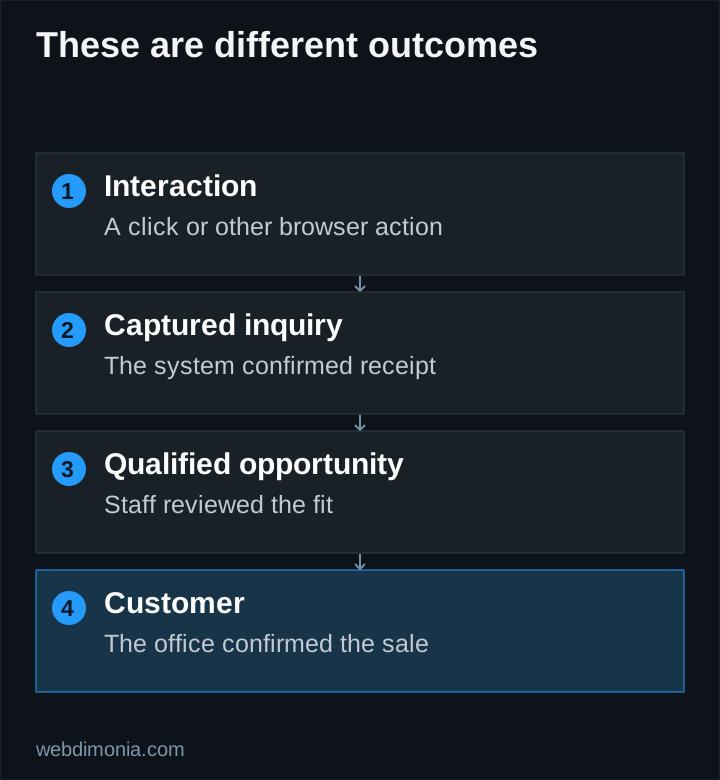
That example is hypothetical, but the distinction matters: a button click, a received inquiry, a qualified opportunity and a bound policy are separate events. Set up tracking so you can tell them apart.
Define the stages before installing tags
| Stage | A practical definition | What it does not prove |
|---|---|---|
| Interaction | A visitor clicks a phone or form control | That contact actually occurred |
| Captured inquiry | The system confirms receipt of a request | That the request is legitimate or eligible |
| Qualified inquiry | Staff confirms agreed fit criteria | That a quote or sale will follow |
| Quote | The agency records a defined quoting milestone | That coverage was bound |
| Customer | The office confirms the agreed sale outcome | That projected lifetime value has been earned |
Choose qualification criteria that staff can apply consistently, such as supported product, relevant territory, genuine intent and a valid way to continue the conversation. Record a specific reason for disqualification rather than labeling every unsuccessful inquiry “bad.”
Select bidding goals deliberately
Google distinguishes primary and secondary conversion actions. Primary actions can inform bidding when their goal is used; secondary actions generally support observation. A custom goal can change that behavior, so inspect the actual campaign setup rather than relying on the label alone. See Google's conversion-action guidance.
Do not automatically make every engagement event primary. A scroll, a page view and a confirmed inquiry have different business value. Counting all of them as acquisition successes can encourage optimization toward the easiest event rather than the most useful one.
For a new account, select a meaningful outcome that can be measured reliably. Moving to a later qualified stage may become appropriate when the office can consistently return timely, accurate outcomes. Do not import unreliable sales labels merely to make the setup appear advanced.
Fire form events after confirmed capture
The browser should receive a successful response from the capture system before recording a completed inquiry. A button click can happen when required fields are missing, the network fails or the server rejects the request.
Use a submission identity to help prevent duplicate records during retries. Verify what happens after a refresh, a repeated click and a delayed response. Test with a designated test recipient or offline test environment so no prospect receives a test message.
Document the difference between successful capture and successful email notification. A system may save a lead even if the notification provider fails. The office needs a dependable way to discover that record, and analytics should reflect the event that actually occurred.
Distinguish phone interest from phone conversations
A telephone-link click is useful diagnostic information, but it is not a connected call. Google's call-reporting documentation describes measurement using Google forwarding numbers and call details. Confirm availability and configuration for the actual account.
Even a connected call may concern an existing policy, an unsupported product or a wrong number. Let staff review the business purpose. A duration threshold can be a practical signal, but duration alone does not establish qualification.
Do not publish a temporary forwarding number as the agency's permanent contact identity. Keep the normal business number documented and review any call-recording or data-processing requirements before enabling those features.
Connect later outcomes through a permitted workflow
If the agency can return qualified or sale outcomes, use an appropriate Google-supported offline or enhanced-conversion process. Google's enhanced conversions for leads guidance is the current implementation reference; settings and supported methods can change.
Keep source identifiers, event timestamps and outcome definitions consistent. Review matching diagnostics, rejected records and the lag between inquiry and sale. Hashing data is not a blanket permission to collect or upload it. Confirm the applicable platform requirements, notices and permissions for the chosen workflow.
Keep policy details, names, phone numbers, email addresses and freeform answers out of ordinary analytics event payloads. Google Analytics prohibits sending personally identifiable information. Inspect URLs and query strings as well as custom event fields.
Reconcile the numbers before trusting the report
Choose a small sample of controlled test submissions and trace each through the website, capture destination and analytics setup. Then reconcile real inquiry totals against office records without exposing customer details in the marketing dashboard.
Expect some differences between systems because attribution rules, consent, blocking, timing and event definitions can differ. Investigate discrepancies instead of forcing the numbers to match by counting extra events.
Use the marketing-report template to show each stage separately. When budget decisions depend on the results, the useful question is not “How many conversions did Google show?” It is “Which measured actions became real opportunities, at what total cost, and with what remaining uncertainty?”