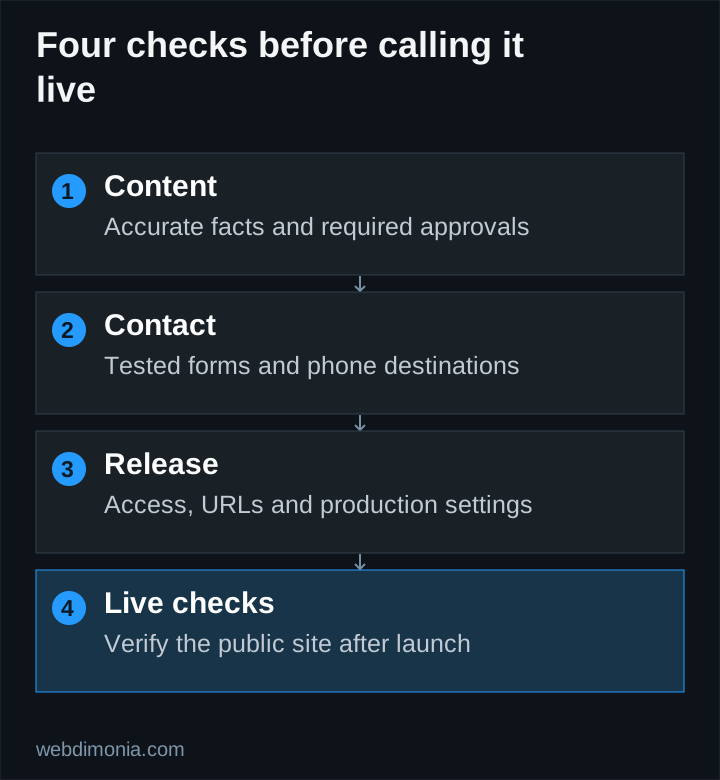
The design is approved and the new site looks ready. Before changing the domain, send a test inquiry, call the office number from your phone and check where the old URLs will go. Those are launch decisions too.
Use this checklist to assign an owner to the final checks. A successful build confirms that the software can be produced; it doesn't confirm that customers can reach the right person.
Confirm the content and public design
Review the real pages at desktop and mobile sizes. Check the agency name, addresses, phone numbers, hours, team details and approved service descriptions. Confirm permission for photographs, logos and any customer quotations.
Verify required carrier review with the agency. A previous website or another office's approval does not establish permission for the current content. Remove placeholder biographies, sample testimonials and unsupported performance claims.
Inspect the image crops, headline wrapping, navigation and footer. Check that the most important content remains readable without relying on motion or a background image. Follow the main visitor journey from the opening screen to the final action.
Test forms and phone routes end to end
Use controlled test data and an agreed recipient. Submit each relevant form path, then confirm that the record reaches the intended destination. Verify the customer-facing confirmation only appears after successful capture.
Test required fields, invalid input, keyboard operation and a recoverable failure. Check that duplicate clicks or a retry do not create unnecessary duplicate requests. Confirm that the office knows where to find a captured inquiry if a notification fails.
Tap phone links on a mobile device and inspect the number. If different offices have different routes, test each one. An attractive contact section with a wrong destination is a release blocker.
Record ownership and operating responsibilities
Confirm domain, DNS, hosting, analytics and search-tool access. Name the billing and renewal owner. Make sure the agency can recover its accounts and that provider access is appropriate.
Preserve business-email records when changing website hosting. Do not remove unfamiliar DNS entries without understanding what service uses them. Keep the prior working configuration available for a controlled rollback if needed.
The website ownership worksheet helps document the handoff. Include the support route, recurring services and who can approve future changes.
Preserve useful URLs and search access
Inventory existing pages that receive relevant traffic, have useful links or serve an operational purpose. Keep their URLs where practical. For pages that move, map each old address to the closest appropriate replacement and test the redirect.
Avoid sending every retired page to the homepage. If there is no relevant replacement, use an appropriate missing-page response rather than pretending the same content still exists. Check internal links after the new structure is in place.
Verify page titles, descriptions, canonical URLs, crawl directives and the sitemap. Structured data should describe visible, accurate facts. Do not launch with production pages accidentally marked noindex, and do not remove protection from a private preview merely to make testing easier.
Check the measurement plan
Confirm that the relevant analytics events fire for the intended actions. Keep a browser interaction separate from a captured inquiry and a staff-qualified opportunity. Inspect payloads and URLs for personal information before enabling production collection.
If ads will launch afterward, test the exact landing URLs and conversion definitions first. Our Google Ads tracking guide explains the distinctions that prevent inflated reports.
Record what has actually been verified. An installed tag is not proof that attribution works, and a configured email provider is not proof that the office received a message.
Use a release checklist with clear acceptance criteria
| Area | Acceptance check |
|---|---|
| Content | Agency facts and required external approvals confirmed |
| Design | Desktop and mobile journeys reviewed on real pages |
| Contact | Intended destinations receive controlled test inquiries |
| Access | Agency and provider responsibilities documented |
| URLs | Important old paths preserved or mapped appropriately |
| Search | Correct metadata, crawl access and sitemap checked |
| Operations | Monitoring, support contact and rollback responsibility assigned |
At Webdimonia, the process runs from strategy and the Website Design Questionnaire through design approval, the Technical Questionnaire, development and testing. Final payment is due before launch; the initial deposit is 50%. The exact scope and responsibilities belong in the project agreement.
Verify the live site after the switch
Open the public domain, repeat critical page and contact checks, inspect redirects and confirm that the correct production version is visible. Check the preferred hostname and HTTPS behavior. A successful preview does not prove that the public domain serves the same release.
Then use the appropriate search tools to submit or inspect the updated site. Google explains that requesting a recrawl does not guarantee inclusion. Keep deployment, crawl access and indexing as separate status items.
Revisit the site after real usage begins. Monitor errors, broken destinations and office feedback. Launch completes the initial build, but accurate content, working contact paths and maintained infrastructure remain ongoing responsibilities.