Someone looking for your office needs a working phone number, current hours and enough detail to find the entrance. A page that repeats “insurance in [city]” doesn't help with any of those tasks.
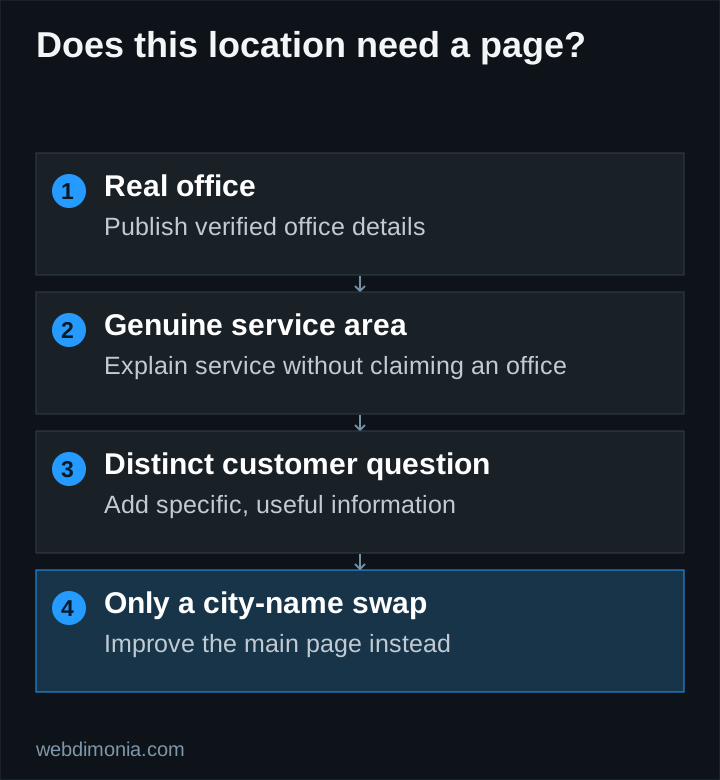
Build location pages around real offices and the questions customers ask about them. You can also explain a genuine service area, but make it clear when there isn't a physical office in that city.
Decide whether the page has a distinct purpose
Create a separate office page when it has information a visitor would otherwise struggle to find: different hours, a different phone number, its own team or a different arrival process. Two real offices can justify two useful pages even when they offer similar services.
For an agency with one office, a detailed contact page may already cover the need. A separate location page should add substance instead of duplicating that page under another URL.
A city name in a keyword list is not sufficient reason to publish a page. Ask, “What would a customer in this area learn here that the main service page does not explain?” If the only answer is a changed place name, improve the main page first.
Put essential office facts near the beginning
A useful opening identifies the agency, the location and the intended next step. Show accurate hours and explain appointment arrangements if relevant. Link the phone number so it works on mobile, and make the destination clear when an inquiry goes to a central team.
Do not bury the address inside a map alone. Publish readable address text and a directions link. Verify the map destination rather than assuming that the business name resolves to the right entrance.
Keep the same facts current across the website and Google Business Profile. Consistency is also an operational benefit: people should not arrive during hours that only an old web page still advertises.
Add details that only this office can provide
Useful content can include a current exterior photograph, the entrance location, parking guidance, accessibility information that has been checked and the team customers may meet. Avoid guessing about accessibility or adding generic directions that nobody has verified.
Describe the office's actual contact process. Can someone walk in, should they book a conversation, or is the initial request handled remotely? Explain what happens after a form submission and whether the office responds during business hours.
If products or service availability differ between locations, have the agency review that copy. A web designer should not infer licensed availability from a nearby office or a carrier logo.
Use this page outline
| Section | Information to supply |
|---|---|
| Introduction | Agency name, actual office location, clear contact action |
| Office details | Address, current hours, direct or clearly labeled central phone |
| People | Real staff and accurate roles, where approved |
| Visit | Entrance, directions and verified practical details |
| Services | Approved descriptions and relevant service-page links |
| Next step | A working form or phone path routed to the right team |
Keep the page as long as its useful content requires. Repeating the same city name through every heading makes the page harder to read without adding information.
Handle service areas honestly
If the agency serves customers remotely in a wider area, say so. Explain the actual contact process and the available service, subject to licensing and carrier restrictions. Do not fabricate a local address, map pin or staff member to make the page appear more local.
A service-area page can be useful when it answers genuinely different questions. For example, it might explain how a particular office handles remote appointments across its approved territory. It should not claim local presence merely because the agency can receive an online inquiry there.
Google identifies doorway and scaled-content abuse in its spam policies. Publishing many interchangeable city pages primarily to capture searches creates risk and maintenance work. Our recommendation is to start with verified office pages and expand only when there is distinct, useful content.
Review routing and links after publication
Link office pages from navigation, contact sections and relevant service pages where a visitor would expect them. Give each page an accurate title and description. If structured data describes an office, make sure the visible page supports the same facts.
Test each phone link and form destination separately. A page for the right location can still fail if every inquiry reaches an unattended inbox. Set a review reminder whenever hours, staffing or addresses change.
For a broader plan, use the local SEO guide. Location pages are one part of helping people find and choose an agency; they do not override distance, competition or the need for an actual useful service.